Setting Up Comment to DM
Turn Instagram comments into automated DMs that start real conversations, deliver links, collect leads, and drive engagement automatically.
Create a Comment to DM Automation
- Navigate to Automations
- Click New Automation
- Select Comment to DM
This automation automatically sends a direct message when someone comments on your Instagram content.
Choose What Triggers the Automation
Select which posts or reels should activate the automation.
Any Post or Reel
The automation will trigger whenever someone comments on any of your Instagram posts or reels.
Best for creators and businesses that want a universal keyword response across all content.
Next Post or Reel
The automation will only apply to the next post or reel you publish after activating it.
Perfect for launches, giveaways, promotions, and limited-time campaigns.
Specific Post or Reel
The automation will only trigger when someone comments on the selected post or reel.
Ideal for targeting individual campaigns or content pieces.
Configure Keywords
Choose which keywords should trigger the automation.
Any Keyword
Every comment will trigger the automation regardless of its content.
Custom Keywords
Only comments containing your selected keywords will trigger a DM.
Examples:
- Keyword:
link - Triggers:
- "send link please"
- "can I get the link?"
- "link pls"
Smart Keyword Matching
Our system automatically recognizes:
- Common spelling mistakes
- Typing variations
- Shortened versions
- Different capitalization
Examples:
linkLINKLinklnklinnk
All can trigger the same automation.
This helps maximize conversions while reducing missed opportunities.
Send a Direct Message
When a user's comment matches your trigger conditions, an automated DM is sent instantly.
Add Links
You can include up to 3 links in a single message.
Common uses include:
- Product pages
- Landing pages
- Booking forms
- Affiliate links
- Lead magnets
- Business websites
Text-Only Messages
You can also send a simple text message without including any links.
Advanced Settings
Advanced settings help you increase engagement, collect leads, and improve conversion rates.
Public Comment Replies
Automatically reply to comments publicly before moving the conversation into DMs.
Public replies help:
- Increase engagement
- Improve social proof
- Encourage additional comments
- Boost post visibility
Reply Variations
Create multiple reply versions to keep interactions natural.
Instead of sending the same response repeatedly, the system rotates through your reply variations automatically.
Example:
- "Check your DMs 👋"
- "Just sent it!"
- "Sent you a message 📩"
- "Take a look in your inbox 😊"
Reply Limits
To protect your account and maintain natural engagement patterns, automatic public replies are rate-limited.
These limits help prevent spam-like behavior and support long-term account health.
Opening Message
The Opening Message acts as a permission step before starting the conversation.
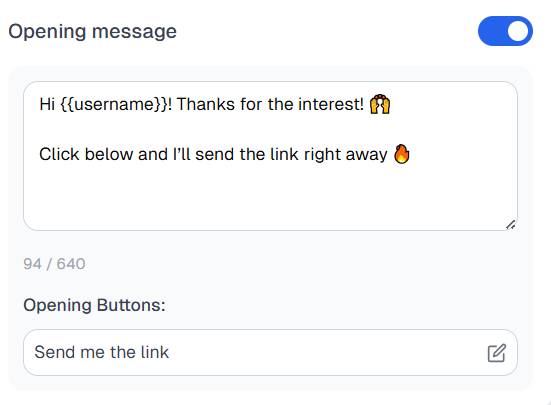
Think of it as:
Note: "Hey! Are you ready to receive this information?"
When the user taps the button inside the Opening Message, they actively opt in to the conversation.
This allows follow-up messages to be delivered within Instagram's messaging window.
Benefits
- Higher delivery reliability
- Better user experience
- Improved compliance with Instagram messaging policies
- Enables advanced automation features
Optional Feature
The Opening Message can be enabled or disabled at any time.
Require a Follow Before Delivering Content
Encourage users to follow your Instagram account before receiving your link or content.
If someone is not already following your account:
- They receive a follow request message.
- They follow your account.
- The automation delivers the requested content.
Important
This check only happens once.
After a user successfully passes the follow check, future automations will send content directly without asking them to follow again.
Why Use It?
- Grow your audience
- Increase follower quality
- Reward engaged users
- Improve long-term reach
Note: Note: The Opening Message must be enabled for this feature to work.
Collect Email Addresses
Capture email addresses directly inside Instagram DMs.
Depending on your setup, the email request will be sent:
- After the Opening Message, or
- As the first automation message if the Opening Message is disabled
Why Collect Emails?
Building an email list helps you:
- Own your audience
- Send newsletters
- Promote products and services
- Stay connected outside social platforms
- Reduce dependency on social media algorithms
Follow Up with Non-Clickers
Automatically re-engage users who did not click your link.
If a contact receives your DM but doesn't interact with the link, a follow-up message can be sent automatically.
Benefits
- Recover missed opportunities
- Increase click-through rates
- Improve conversions
- Continue conversations with interested prospects
Example Follow-Up
Note: "Just making sure you saw this 👀 Here's the link again."
Important
The Opening Message must be enabled for follow-ups to work.
The Opening Message refreshes the user's messaging permission window, allowing follow-up messages to be delivered successfully.
Best Practices
For the highest conversion rates:
✅ Use clear and simple keywords
✅ Add multiple public reply variations
✅ Enable Opening Messages
✅ Collect emails when appropriate
✅ Use follow-up messages for non-clickers
✅ Include a clear call-to-action in every DM
By combining these features, you can turn Instagram comments into meaningful conversations, qualified leads, and paying customers automatically.


Was this article helpful?